Subscribe
Smile Digital Solution Logo
Smile Digital Solution
  • Tech
  • News
  • Fintech
  • Trends & Insights
  • Interesting
  • How-To & Guides
  • Gadget
  • Research & Reports
  • Deal Alert
  • Web Stories
  • MORE NEWS
  • About Us
  • Contact Us
  • Newsletter
Home HOW-TO & GUIDES Migrate Your ImePay Account to Khalti – A Step-by-Step: Tutorial Video

Migrate Your ImePay Account to Khalti – A Step-by-Step: Tutorial Video
By Smile Digital Solution July 15, 2025 at 7:11 pm
Poster showing step-by-step guide to migrate IME Pay account to Khalti in 2025 with smartphone graphics and digital wallet icons
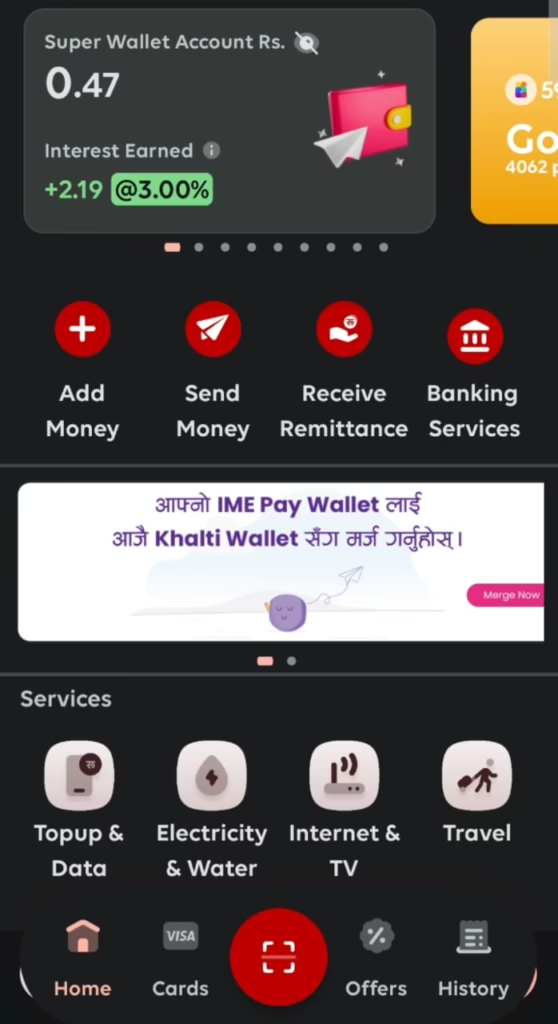
ImePay User Interface showing Notification of Migration to Khalti
dda83160b2e0f89f237042c02373ea5e6f256d8d8151faf3e7999246228ea93a?s=48&d=mm&r=g Migrate Your ImePay Account to Khalti – A Step-by-Step: Tutorial Video

Smile Digital Solution

Following the recent merger of Nepal’s leading digital wallets, IME Pay and Khalti, users with accounts in both platforms using the same mobile number have had their accounts automatically migrated to the Khalti app. For those with only an IME Pay account, a manual migration process is required to transition to Khalti seamlessly. This step-by-step guide will walk you through the process of migrating your IME Pay account to Khalti, ensuring a smooth and secure transfer of your funds, reward points, and account details.

The migration must be completed within 3 months from Shrawan 1, 2082 (July 16, 2025), when the joint operation of Khalti and IME Pay officially begins.

Why Migrate to Khalti?

The merger of IME Pay and Khalti, approved by Nepal Rastra Bank, has created IME Khalti Limited, poised to become Nepal’s largest digital wallet platform. Migrating to Khalti ensures you continue to enjoy a user-friendly, secure, and trusted payment ecosystem with enhanced features and broader service coverage. The newly merged company is set to begin joint operations starting Shrawan 1, 2082 (July 17, 2025). This guide simplifies the process for a hassle-free transition.

Prerequisites for Migration

Before starting the migration process, ensure the following:

  • KYC Verification: Both your IME Pay and Khalti accounts must be fully KYC-verified to comply with regulatory guidelines and ensure security.
  • Matching Account Details: The name, identity type (e.g., citizenship, passport), identity number, and date of birth (DOB) must be identical in both IME Pay and Khalti accounts.
  • Registered Mobile Number: The mobile number linked to your IME Pay account should be active and consistent across both platforms.
  • Stable Internet Connection: A reliable internet connection is necessary to access both apps.
  • Latest App Versions: Ensure you have the latest versions of the IME Pay and Khalti apps installed on your device.

If your KYC verification is incomplete or account details do not match, update them in both apps before proceeding.

Step-by-Step Guide to Migrate Your IME Pay Account to Khalti

Follow these steps to migrate your IME Pay account to Khalti:

Step 1: Open Your ImePay App

Launch the IME Pay application on your smartphone. Ensure you’re logged in with your registered mobile number and have completed KYC verification with matching details (name, identity type, identity number, and DOB).

Step 2: Check for Migration Notification

Upon logging in, you may see a notification about the merger and migration process. Look for a “Migrate to Khalti” or similar option in the IME Pay app’s main menu or settings. This feature appears under Main Menu Notification Bar.

Process of Migration from Imepay to Khalti
Step 2: Check for Migration Notification

Step 3: Proceed with Migration

You will be prompted to “Proceed” with the migration. Confirm this action to move forward with the process.

WhatsApp Image 2025 07 15 at 23.25.03 7e0f216b Migrate Your ImePay Account to Khalti – A Step-by-Step: Tutorial Video
Step 3: Proceed with Migration

Step 4: Enter OTP for Verification

For security, you’ll receive a One-Time Password (OTP) on your registered mobile number. Enter the OTP in the IME Pay app to verify your identity.

WhatsApp Image 2025 07 15 at 23.24.49 c2ca93fc edited Migrate Your ImePay Account to Khalti – A Step-by-Step: Tutorial Video
Enter OTP for Verification

Step 5: Verify Information

The system will compare your account details between IME Pay and Khalti:

  • Successful Match: If your name, identity type, identity number, and DOB match in both apps, a “blue tick” will appear, indicating a successful verification.
  • Discrepancy Detected: If there’s a mismatch, a “red cross” will be displayed. You’ll need to update your information in either IME Pay or Khalti to ensure all details are identical before proceeding.

Step 6: Agree to Terms and Conditions

Review the terms and conditions for the migration process. Check the box or click “Agree” to accept them and continue.

Step 7: Confirm Migration

After verifying your details and agreeing to the terms, click the “Confirm” button to complete the migration. Your IME Pay balance, reward points, and transaction history will be transferred to your Khalti account instantly.

WhatsApp Image 2025 07 15 at 23.24.09 60990499 Migrate Your ImePay Account to Khalti – A Step-by-Step: Tutorial Video
Confirm Migration

After confirmation, a “Congratulations” Sign pops up. Now you have successfully synced the Profile to Khalti.

WhatsApp Image 2025 07 15 at 23.24.20 f8f1cdb1 Migrate Your ImePay Account to Khalti – A Step-by-Step: Tutorial Video

Once you have completed these steps and confirmed, your ImePay account will be successfully migrated to Khalti. This means all your points and money are now in Khalti, and your migration is complete.

Here is a Video Tutorial:

Post-Migration Tips

  • Check Transaction History: Ensure all your previous transactions from IME Pay are reflected in the Khalti app.
  • Update Payment Details: If you use Khalti for recurring payments or linked services, update the payment details as needed.
  • Explore Khalti Features: Take advantage of Khalti’s enhanced features, such as bill payments, mobile top-ups, and merchant transactions.
  • Act Before the Deadline: Complete the migration by Bhadra 30, 2082 (October 15, 2025), to avoid potential account access issues.
  • Contact Support if Needed: If you encounter issues during migration, such as a mismatch in account details or failed OTP verification, contact Khalti’s customer support via the app or their official website.

Conclusion

Migrating your IME Pay account to Khalti is a straightforward process when you ensure your account details match and follow the outlined steps. By completing the migration within 3 months from Shrawan 1, 2082 (July 16, 2025), you’ll gain access to Khalti’s enhanced digital payment platform, ensuring a seamless and secure experience. Your funds, reward points, and transaction history are now safely housed in Khalti, ready for you to explore its full range of features.

For further assistance, visit Khalti’s official website or contact their support team. Start your migration today and embrace the future of digital payments in Nepal!

Follow us for More updates.

Last updated on July 15, 2025 at 7:11 pm

React to this post

Leave a Reply Cancel reply

Your email address will not be published. Required fields are marked *

Most Read

  • Introducing Googlebook, designed for Gemini Intelligence

    Googlebook Gemini Laptops: AI Revolution 2026

  • Students using Google AI tools like Gemini Advanced and NotebookLM on laptops in a classroom setting

    Google AI Pro Now Free for Students: How to Access in 5 Min

  • image 1 The Synergy of IoT and Edge Computing: Powering the Future of Connectivity

    The Synergy of IoT and Edge Computing: Powering the Future of Connectivity

  • SEE Result 2081 Published

    SEE Result 2081 Published: Check Your Grades Now!

  • Google Workspace, FINRA Compliance, Financial Services

    Google Workspace Introduces FINRA Compliance & New Capabilities

Get Website Builder + email marketing tool Hostinger Reach!

Live | FIFA world cup 2026

Recent Posts

  • China YILO Drones Still Orbit Gyirong Flood Zone Near Nepal Tibet Border
  • China Deploys YILO4201 & YIL O4200 for Tibet Flood Rescue
  • Nepal Rasuwagadhi Flood Satellite Views
  • Nepal Launches Flood Relief Portal for Foreign Donors
  • Google offering AI Plus Free for Students, How to Apply from Nepal

Follow Us

  • Facebook
  • Instagram
  • X
  • Pinterest
  • LinkedIn

Categories

  • AI
  • Deal Alert
  • FINTECH
  • GADGETS
  • GAMES
  • HOW-TO & GUIDES
  • INTERESTING
  • MORE NEWS
  • News
  • RESEARCH & REPORTS
  • Space Exploration
  • TECH
  • Technology
  • TRENDS & INSIGHTS

Recent News

Flightradar24 live map showing Chinese UAV YILO4200 flying a circular orbit over Gyirong Town and nearby villages on the China-Nepal border in Tibet on August 29, 2026, ranked among the world’s most tracked flights during ongoing flood and mudslide rescue operations. Image 2 (YILO4201 Flightradar24 screenshot): , Flightradar24 live tracking of Chinese UAV YILO4201 maintaining a dense circular flight path over the Gyirong Port disaster zone on the Tibet-Nepal border, ranked second worldwide, supporting continued search, communications and barrier-lake monitoring after the August 26, 2026 mudslide.

China YILO Drones Still Orbit Gyirong Flood Zone Near Nepal Tibet Border

August 29, 2026
Flightradar24 map showing Chinese UAV YILO4201 flying continuous circular orbits over Gyirong Town and nearby villages on the China-Nepal border in Tibet after the August 26 2026 mudslide and flood. White Wing Loong-series long-endurance drone associated with YILO4201 taxiing on a high-altitude runway in Tibet during emergency response operations

China Deploys YILO4201 & YIL O4200 for Tibet Flood Rescue

August 28, 2026
View the Rasuwagadhi/Kerung border crossing before and after the floods in satellite images. Source: NDRRMA

Nepal Rasuwagadhi Flood Satellite Views

August 27, 2026
Donate for the Government of Nepal Prime Minister Disaster Relief Fund

Nepal Launches Flood Relief Portal for Foreign Donors

August 27, 2026

INSIGHTS & STORIES

Recommended Reads
AI agent Big Sleep intercepting cyberattack in a futuristic digital environment

How Google’s “Big Sleep” AI Agent Stops SQLite 0‑Day Exploit

Students using Google AI tools like Gemini Advanced and NotebookLM on laptops in a classroom setting

Google AI Pro Now Free for Students: How to Access in 5 Min

West Indies vs Australia 2025 cricket match streaming guide

West Indies vs Australia T20I 2025: How to Watch Live

COMPEX is a scholarship scheme provided to Nepalese students by the Government of India

India Opens Doors for Nepalese Aspirants: COMPEX-2025 Scholarship Now Live

Ncell VoLTE Activation Guide with Supported Devices

How to Activate and Use Ncell VoLTE for Clearer Calls

iPhone screen showcasing iOS 26 Liquid Glass UI with Apple Intelligence features

iOS 26: Apple’s Bold Leap Forward

Sri Lanka Fintech Summit 2025 logo

Sri Lanka FinTech Summit 2025: Unlocking the Future of Digital Finance in South Asia

"Hostinger 20% Off – Web, Cloud, VPS Hosting, Business Email & Website Builder

Deal Alert: Get 20% Discount on Hostinger Hosting & More

Popular Categories

  • GADGETS
  • HOW-TO & GUIDES
  • News
  • TECH
  • MORE NEWS
  • INTERESTING
  • FINTECH
  • TRENDS & INSIGHTS
  • RESEARCH & REPORTS
  • Deal Alert
  • AI
  • Technology
  • Space Exploration
  • GAMES
Smile Digital Solution Logo

Smile Digital Solution is your go-to platform for the latest tech news, expert how-to guides, digital trends, and smart tips.

Quick Links

  • Contact
  • Newsletter
  • Privacy Policy
  • Terms of Service

Subscribe to Our Newsletter

Connect With Us

Join us at WhatsApp
Copyright © 2026. Smile Digital Solution, All Rights Reserved. | Developed by SmileDigital.dev

Accessibility Dashboard

Loading...