
Migrate Your ImePay Account to Khalti – A Step-by-Step: Tutorial Video
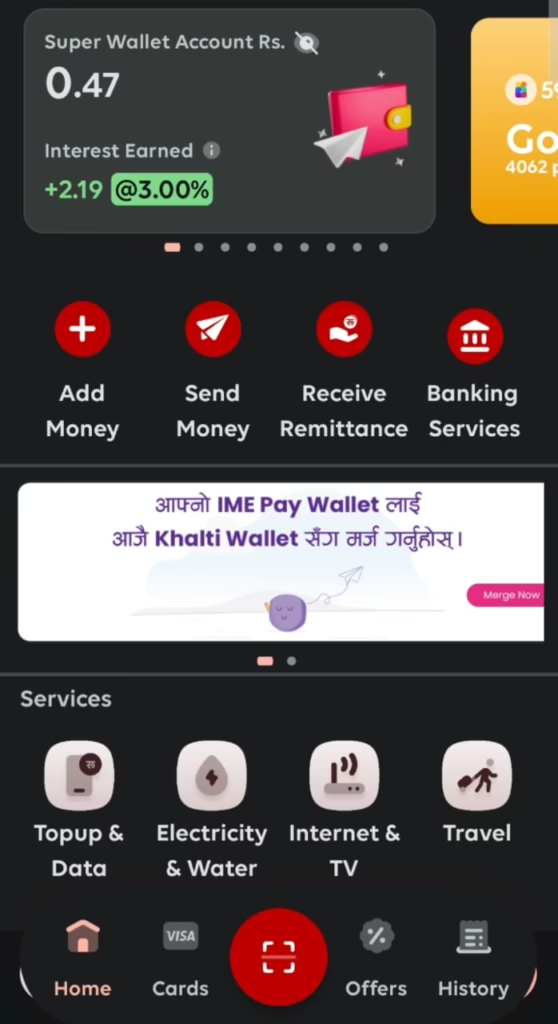

Following the recent merger of Nepal’s leading digital wallets, IME Pay and Khalti, users with accounts in both platforms using the same mobile number have had their accounts automatically migrated to the Khalti app. For those with only an IME Pay account, a manual migration process is required to transition to Khalti seamlessly. This step-by-step guide will walk you through the process of migrating your IME Pay account to Khalti, ensuring a smooth and secure transfer of your funds, reward points, and account details.
The migration must be completed within 3 months from Shrawan 1, 2082 (July 16, 2025), when the joint operation of Khalti and IME Pay officially begins.
Why Migrate to Khalti?
The merger of IME Pay and Khalti, approved by Nepal Rastra Bank, has created IME Khalti Limited, poised to become Nepal’s largest digital wallet platform. Migrating to Khalti ensures you continue to enjoy a user-friendly, secure, and trusted payment ecosystem with enhanced features and broader service coverage. The newly merged company is set to begin joint operations starting Shrawan 1, 2082 (July 17, 2025). This guide simplifies the process for a hassle-free transition.
Prerequisites for Migration
Before starting the migration process, ensure the following:
- KYC Verification: Both your IME Pay and Khalti accounts must be fully KYC-verified to comply with regulatory guidelines and ensure security.
- Matching Account Details: The name, identity type (e.g., citizenship, passport), identity number, and date of birth (DOB) must be identical in both IME Pay and Khalti accounts.
- Registered Mobile Number: The mobile number linked to your IME Pay account should be active and consistent across both platforms.
- Stable Internet Connection: A reliable internet connection is necessary to access both apps.
- Latest App Versions: Ensure you have the latest versions of the IME Pay and Khalti apps installed on your device.
If your KYC verification is incomplete or account details do not match, update them in both apps before proceeding.
Step-by-Step Guide to Migrate Your IME Pay Account to Khalti
Follow these steps to migrate your IME Pay account to Khalti:
Step 1: Open Your ImePay App
Launch the IME Pay application on your smartphone. Ensure you’re logged in with your registered mobile number and have completed KYC verification with matching details (name, identity type, identity number, and DOB).
Step 2: Check for Migration Notification
Upon logging in, you may see a notification about the merger and migration process. Look for a “Migrate to Khalti” or similar option in the IME Pay app’s main menu or settings. This feature appears under Main Menu Notification Bar.

Step 3: Proceed with Migration
You will be prompted to “Proceed” with the migration. Confirm this action to move forward with the process.

Step 4: Enter OTP for Verification
For security, you’ll receive a One-Time Password (OTP) on your registered mobile number. Enter the OTP in the IME Pay app to verify your identity.

Step 5: Verify Information
The system will compare your account details between IME Pay and Khalti:
- Successful Match: If your name, identity type, identity number, and DOB match in both apps, a “blue tick” will appear, indicating a successful verification.
- Discrepancy Detected: If there’s a mismatch, a “red cross” will be displayed. You’ll need to update your information in either IME Pay or Khalti to ensure all details are identical before proceeding.
Step 6: Agree to Terms and Conditions
Review the terms and conditions for the migration process. Check the box or click “Agree” to accept them and continue.
Step 7: Confirm Migration
After verifying your details and agreeing to the terms, click the “Confirm” button to complete the migration. Your IME Pay balance, reward points, and transaction history will be transferred to your Khalti account instantly.

After confirmation, a “Congratulations” Sign pops up. Now you have successfully synced the Profile to Khalti.

Once you have completed these steps and confirmed, your ImePay account will be successfully migrated to Khalti. This means all your points and money are now in Khalti, and your migration is complete.
Here is a Video Tutorial:
Post-Migration Tips
- Check Transaction History: Ensure all your previous transactions from IME Pay are reflected in the Khalti app.
- Update Payment Details: If you use Khalti for recurring payments or linked services, update the payment details as needed.
- Explore Khalti Features: Take advantage of Khalti’s enhanced features, such as bill payments, mobile top-ups, and merchant transactions.
- Act Before the Deadline: Complete the migration by Bhadra 30, 2082 (October 15, 2025), to avoid potential account access issues.
- Contact Support if Needed: If you encounter issues during migration, such as a mismatch in account details or failed OTP verification, contact Khalti’s customer support via the app or their official website.
Conclusion
Migrating your IME Pay account to Khalti is a straightforward process when you ensure your account details match and follow the outlined steps. By completing the migration within 3 months from Shrawan 1, 2082 (July 16, 2025), you’ll gain access to Khalti’s enhanced digital payment platform, ensuring a seamless and secure experience. Your funds, reward points, and transaction history are now safely housed in Khalti, ready for you to explore its full range of features.
For further assistance, visit Khalti’s official website or contact their support team. Start your migration today and embrace the future of digital payments in Nepal!
Follow us for More updates.
Last updated on July 15, 2025 at 7:11 pm


